Loading articles
Core path · 19 of 34
Experience Fragment Architecture — Reusable Experiences Across Channels
Understand how Experience Fragments help AEM teams create reusable, presentation-driven experiences, how they are structured, and where they fit in a real AEM architecture.
On this page26 sections
Content Objective
The last few chapters focused on Content Fragments.
We looked at structured content, Content Fragment Models, references, reuse, composition, and finally how reusable content should be organized and governed.
Content Fragments solve an important problem:
They allow business content to exist independently from a specific page or presentation.
But that is not the only type of reuse an AEM project needs.
Sometimes the requirement is not:
"We need to reuse this content."
It is:
"We need to reuse this authored experience."
Consider a promotional campaign.
A marketing team creates a campaign block containing:
- A headline
- An image
- Supporting text
- A call to action
- Component configuration
- Layout and presentation
The same campaign experience may need to appear on several pages.
The team could recreate the components on every page.
That works initially.
But when the campaign changes, every copy needs to be found and updated.
The problem is no longer content duplication alone.
The problem is that the authored experience has been duplicated.
This is where Experience Fragments become useful.
An Experience Fragment provides a reusable boundary around an authored AEM experience so that it can be created independently and reused where required.
Before looking at the implementation, there is one distinction to keep in mind throughout this chapter:
Content Fragments represent structured content. Experience Fragments represent reusable authored experiences.
That distinction explains most of the architectural decisions that follow.
Why Experience Fragments Exist
AEM pages are designed to contain complete page experiences.
Authors can place components, configure them, arrange them using layouts, and create the final page.
That works well when the experience belongs to one page.
The problem appears when the same authored experience needs to appear in multiple places.
Imagine a campaign banner used on:
- The homepage
- Product category pages
- Landing pages
- Campaign pages
If the author creates the banner separately on every page, there are now multiple copies of the same experience.
A change to the campaign requires multiple updates.
An Experience Fragment allows the team to move that shared experience into its own reusable object.
The marketing team can author the experience independently, and pages can reference it where required.
The important difference is what is being reused.
With structured content, the consuming experience decides how the content should look.
With an Experience Fragment, the authored component structure and presentation are part of what is being reused.
What an Experience Fragment Contains
An Experience Fragment is built from AEM components.
That means it can contain more than a collection of text fields.
An authored experience may include:
- Components
- Component configuration
- Layout
- Images
- Text
- Links
- Styling-related configuration
- Other supported authored content
For example, a promotional experience might contain a title, image, supporting text, and CTA.
The important point is that the Experience Fragment owns the authored component structure.
This is different from a Content Fragment, where the focus is on structured content fields rather than an authored component tree.
Where Experience Fragments Live
Experience Fragments have their own repository hierarchy.
They are stored under:
text
/content/experience-fragments/
For example, a project may organize them under a structure similar to:
text
/content/experience-fragments/
    my-project/
        en/
            promotions/
            global/
The exact structure depends on the project.
The important part is that Experience Fragments are maintained separately from the site's normal page hierarchy.
This gives the reusable experience its own repository location and lifecycle.
It also makes the distinction between pages, Content Fragments, and Experience Fragments visible when working directly with the repository.
Pages, Content Fragments, and Experience Fragments each have their own repository boundaries, making it easier to understand ownership, authoring, and troubleshooting responsibilities.
For developers, knowing these boundaries is useful when tracing an authoring or rendering problem.
An Experience Fragment Is Not Just a Reusable Component
It is tempting to think of an Experience Fragment as another way to create a reusable component.
That is not the right mental model.
A reusable component defines a reusable component implementation.
An Experience Fragment defines a reusable authored instance of an experience.
Consider a promotional component.
The component implementation might define:
- What fields exist
- How the component renders
- What variations are supported
- How authors configure it
An Experience Fragment can then contain an authored promotional experience using that component.
The distinction is:
Component
- How should this type of component work?
Experience Fragment
- What specific authored experience should be reused?
This distinction prevents a common architectural mistake: creating Experience Fragments for every small reusable UI element.
If the requirement is simply a reusable component implementation, build or reuse a component.
If the requirement is to author a meaningful experience once and reuse that authored experience across multiple places, an Experience Fragment becomes more appropriate.
How a Page Uses an Experience Fragment
A page does not need to copy the Experience Fragment's component structure into its own repository structure.
Instead, the page can use an Experience Fragment component to reference the reusable experience.
For example, a homepage may contain an Experience Fragment component that points to a campaign Experience Fragment.
The page controls where the experience appears.
The Experience Fragment controls what the reusable experience contains.
This separation is important.
If several pages reference the same Experience Fragment, they can all use the same authored experience rather than maintaining independent copies.
When the Experience Fragment is updated and the updated version is published, the pages that reference it can consume that updated experience, subject to the normal publish and caching flow.
That shared relationship is the main reason to introduce an Experience Fragment.
Reuse Has a Cost
Reuse sounds simple: "Create once and use it everywhere."
The architectural reality is slightly more complicated.
The same shared object can also create a shared dependency.
Suppose one Experience Fragment is referenced by twenty pages.
That is the benefit of centralizing the experience, but it is also the operational responsibility that comes with it.
Before making an Experience Fragment reusable, ask:
- Who owns it?
- Which pages use it?
- Who can modify it?
- Who approves changes?
- How is it published?
- What happens when the experience needs to be retired?
The more widely an Experience Fragment is reused, the more important these questions become.
This is the same governance principle we discussed for Content Fragments:
- Reuse should come with an intentional ownership and lifecycle model.
Experience Fragment Variations
The same authored experience does not always need to look identical in every delivery context.
A campaign may need one version for the website and another version for a different delivery requirement.
For example, a website experience may use a wide promotional layout, while another channel may require a more constrained structure.
Creating completely unrelated experiences can lead to unnecessary duplication.
Experience Fragment variations provide a way to maintain related versions of an experience when there is a genuine delivery or presentation difference.
The important word is related.
A variation should exist because the experience has a meaningful relationship with another version.
It should not exist simply because the project can create another variation.
For example, a campaign may have:
- A primary web experience
- A variation adapted for another delivery context
- A variation with a different presentation requirement
The underlying campaign or business context remains related, while the authored experience can differ where necessary.
This gives authors flexibility without requiring every variation to be treated as a completely unrelated experience.
Variations Should Have a Reason
Variations can easily become another source of content sprawl.
A team might create:
- Master
- Version 1
- Version 2
- Version 3
- New
- Final
- Final Updated
That is not meaningful variation management.
A variation should have a clear reason to exist.
Good reasons may include:
- Different delivery requirements
- Different presentation requirements
- Different regional experience
- Different campaign context
- A specific channel constraint
Poor reasons include:
- Temporary experimentation that was never removed
- Copying an experience because the original was difficult to find
- Creating variations without a defined consumer
The architectural question should be:
What is different about this delivery context that justifies another experience variation?
If there is no clear answer, another variation may not be necessary.
Experience Fragment Templates
Once Experience Fragments become part of a larger implementation, authors need appropriate boundaries.
An unrestricted authoring environment can allow experiences to become inconsistent.
For example, an experience intended for a constrained delivery channel should not necessarily allow every component available on a normal web page.
Experience Fragment templates can provide those boundaries.
A template can establish the starting structure and the components that authors are allowed to use.
This gives the project control over the kinds of experiences authors can create.
The architectural principle is similar to editable page templates, but the object being governed is different.
Page templates establish boundaries for page authoring.
Experience Fragment templates establish boundaries for reusable experience authoring.
That distinction becomes useful when an AEM implementation supports multiple types of experiences.
Experience Fragment Rendering
An Experience Fragment is authored separately from the page, but it can become part of the rendered page experience.
When a page references an Experience Fragment, the Experience Fragment component resolves the referenced experience and renders it as part of the page.
The important thing for developers is that the page does not own a duplicated copy of the Experience Fragment's component tree.
The reusable experience remains in its own repository location.
This is useful when debugging.
Suppose a campaign experience appears incorrectly on several pages.
Instead of opening every page and inspecting the individual components, first determine whether those pages reference the same Experience Fragment.
If they do, investigate the shared Experience Fragment.
A Practical Example: Global Footer
A footer may contain:
- Navigation
- Legal links
- Copyright information
- Regulatory information
- Supporting content
If the same authored footer experience needs to appear across multiple pages, maintaining it independently on every page creates unnecessary duplication.
An Experience Fragment can provide a reusable boundary for that experience.
However, regional or site-specific requirements still need to be considered.
If different markets have different legal requirements, forcing every market to use one identical Experience Fragment may create more problems than it solves.
The right approach is to identify what is genuinely common and what genuinely needs to differ.
Reuse should reduce duplication without hiding legitimate business differences.
Production Troubleshooting
Experience Fragments introduce shared dependencies, so troubleshooting needs to follow those dependencies.
Problem: The Updated Experience Is Not Showing
Suppose an author updates an Experience Fragment and publishes it, but the page still shows the previous version.
Do not immediately modify the page.
Check the chain in order:
- Is the correct Experience Fragment being referenced?
- Is the updated Experience Fragment published?
- Is the expected variation being used?
- Is the publish environment serving the updated content?
- Is a cache serving an older response?
The exact cache behavior depends on the implementation and delivery architecture.
The important point is that the page and Experience Fragment have separate content lifecycles.
The problem may exist outside the page itself.
Problem: The Expected Experience Fragment Template Is Not Available
An author may be unable to create the Experience Fragment they expect.
Possible areas to investigate include:
- Project configuration
- Template availability
- Allowed paths
- Permissions
- Template policies
- Authoring configuration
The exact configuration depends on the AEM implementation.
The troubleshooting principle is more important:
If an author cannot create an expected experience, verify the authoring boundaries before assuming the content itself is the problem.
Problem: One Change Affects More Pages Than Expected
This is the opposite problem.
An author updates an Experience Fragment expecting to change one page, but several pages are affected.
That may be completely expected if the same Experience Fragment is shared.
The investigation should determine:
- Which pages reference the Experience Fragment?
- Was the change intended to be global?
- Should the pages use different experiences?
- Should the shared experience have been split?
This is an architectural decision, not necessarily a platform defect.
The more widely an Experience Fragment is reused, the more carefully its ownership and scope should be defined.
Experience Fragments and Headless Architecture
Experience Fragments are often discussed alongside headless AEM because modern AEM implementations may support both page-based and headless delivery.
But they solve different problems.
A headless application generally needs structured content that it can retrieve and render using its own frontend.
That is where Content Fragments become important.
An Experience Fragment is different because its value comes from an authored AEM experience, including components and presentation.
Therefore, a project should not introduce an Experience Fragment simply because the project is described as "headless."
Instead, ask what the consumer actually needs.
If it needs structured business data, use the structured content architecture.
If it needs a reusable AEM-authored experience, an Experience Fragment may be appropriate.
This distinction prevents presentation concerns from leaking into a content model that should remain channel-independent.
Reuse vs Coupling
Reuse and coupling are closely related.
An Experience Fragment reduces duplication because several pages can reference one authored experience.
But those pages are now dependent on that shared experience.
That dependency is not automatically bad.
It is the reason the reuse exists.
The important question is whether the dependency is intentional.
For example, a global footer should probably have a shared lifecycle.
A campaign banner that is intentionally managed centrally may also have a shared lifecycle.
A small piece of page-specific promotional content may not.
This gives us a useful architectural rule:
Create an Experience Fragment when the experience itself deserves an independent shared lifecycle.
If it does not, normal page authoring or component reuse may be simpler.
Experience Fragment Governance
Once Experience Fragments become widely used, governance becomes important.
Teams should establish clear answers to questions such as:
- Who owns Experience Fragments?
- Who can create them?
- Who can modify them?
- Who can publish them?
- How are they named?
- Where are they stored?
- Which templates can be used?
- When should an experience become a variation?
- When should an experience be retired?
This does not mean every Experience Fragment needs a complicated approval process.
Governance should match the impact of the experience.
A private page-specific experience needs less governance than a global experience used across hundreds of pages.
The important thing is to make the ownership boundary explicit.
The Architectural Trade-Off
Experience Fragments solve a real duplication problem.
But they should not become the default answer to every reuse requirement.
The architectural trade-off is straightforward.
Benefits:
- Reuse of authored experiences
- Centralized experience management
- Reduced duplication
- Consistent presentation
- Independent authoring
- Ability to maintain related variations
Costs:
- Shared dependencies
- Larger change impact
- Additional governance
- More repository objects
- Potential variation sprawl
- More complex publishing and caching considerations
The decision should therefore be based on the lifecycle of the experience.
Ask:
Does this experience need to be authored independently and shared across multiple consumers?
If yes, an Experience Fragment may be a good architectural boundary.
If no, adding an Experience Fragment may simply introduce another layer of complexity.
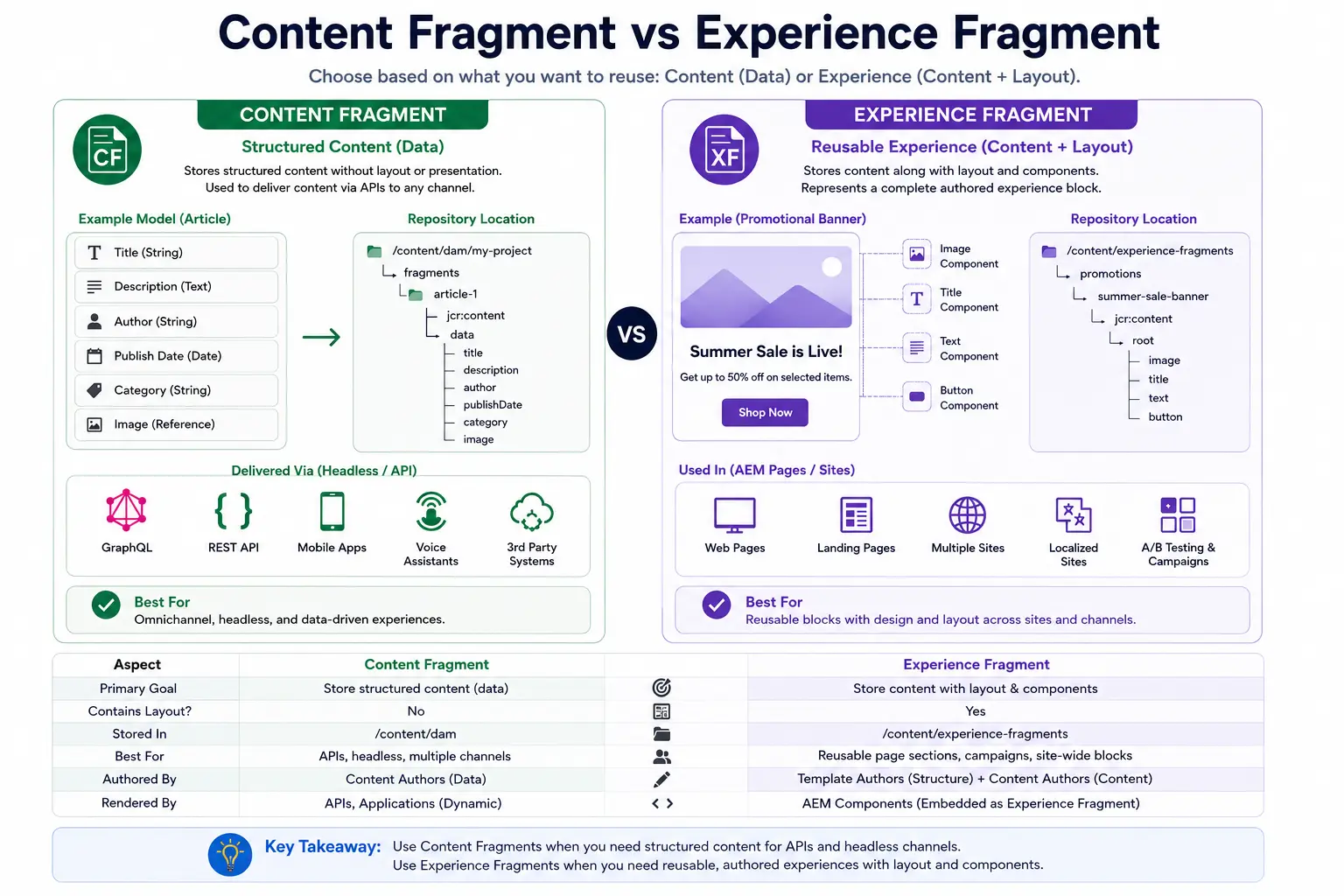
Content Fragment vs Experience Fragment
The difference can be summarized simply.
A Content Fragment represents structured business content.
An Experience Fragment represents a reusable authored experience.
For example:
A Product Content Fragment may contain product information that a website, mobile application, or API consumer can use.
A Promotional Experience Fragment may contain an authored campaign block that several AEM pages need to display.
The distinction is not about which feature is more powerful.
It is about what the organization needs to manage.
If the consumer needs the data and controls the presentation, structured content is usually the better boundary.
If AEM needs to own the authored component structure and presentation, an Experience Fragment may be the better boundary.
The detailed architectural comparison between Pages, Content Fragments, and Experience Fragments will be covered in the next chapter.
Why Architects Care
At a small scale, an Experience Fragment can look like a convenient way to reuse a banner.
At enterprise scale, the more important question is:
Where should responsibility for a reusable experience live?
Without a reusable experience boundary, teams may copy the same experience across many pages.
With an Experience Fragment, that experience has its own:
- Repository location
- Authoring boundary
- Ownership
- Lifecycle
- Publishing process
- Reuse relationship
That makes the experience easier to manage centrally.
But it also means that the architectural team needs to understand the dependency created by that reuse.
One shared Experience Fragment can affect many pages.
That is the feature working as designed.
The architecture simply needs to make that dependency intentional.
Summary
Experience Fragments provide a way to create and reuse authored AEM experiences.
The key points are:
- An Experience Fragment contains an authored component structure and presentation.
- Pages can reference the same Experience Fragment instead of maintaining separate copies.
- Variations are useful when related experiences have genuine delivery or presentation differences.
- Reuse creates shared dependencies, so ownership, publishing, and lifecycle need to be considered.
- Not every reusable component or piece of content should become an Experience Fragment.
The most important architectural question is:
Does this experience need its own shared lifecycle?
If yes, an Experience Fragment may be the right boundary.
What's Next?
We have now looked at Pages, Content Fragments, and Experience Fragments individually.
The next challenge is choosing between them.
A real requirement may initially sound simple:
"We need to create this content in AEM."
But that does not tell us whether the requirement belongs in a Page, a Content Fragment, or an Experience Fragment.
The choice depends on what the object represents, whether it needs to exist independently of a page, who owns the presentation, how it will be consumed, and whether it needs a shared lifecycle.
In the next chapter, we'll bring the three concepts together and build a practical decision framework:
Chapter 20 — Content Fragment vs Experience Fragment vs Page
Enjoyed this chapter?
Get an email when I publish the next chapter. No spam — just new technical deep-dives.
Comments
Share feedback or questions about this blog post.
No comments yet. Be the first to share your thoughts.